
Specification · Superseded
Open Model Context Protocol
Version 2025-03-26
1 Specification
Model Context Protocol (MCP) is an open protocol that enables seamless integration between LLM applications and external data sources and tools. Whether you're building an AI-powered IDE, enhancing a chat interface, or creating custom AI workflows, MCP provides a standardized way to connect LLMs with the context they need.
This specification defines the authoritative protocol requirements, based on the TypeScript schema in schema.ts.
For implementation guides and examples, visit openmodelcontextprotocol.org.
The key words "MUST", "MUST NOT", "REQUIRED", "SHALL", "SHALL NOT", "SHOULD", "SHOULD NOT", "RECOMMENDED", "NOT RECOMMENDED", "MAY", and "OPTIONAL" in this document are to be interpreted as described in BCP 14 [RFC2119] [RFC8174] when, and only when, they appear in all capitals, as shown here.
Overview
MCP provides a standardized way for applications to:
- Share contextual information with language models
- Expose tools and capabilities to AI systems
- Build composable integrations and workflows
The protocol uses JSON-RPC 2.0 messages to establish communication between:
- Hosts: LLM applications that initiate connections
- Clients: Connectors within the host application
- Servers: Services that provide context and capabilities
MCP takes some inspiration from the Language Server Protocol, which standardizes how to add support for programming languages across a whole ecosystem of development tools. In a similar way, MCP standardizes how to integrate additional context and tools into the ecosystem of AI applications.
Key Details
Base Protocol
- JSON-RPC message format
- Stateful connections
- Server and client capability negotiation
Features
Servers offer any of the following features to clients:
- Resources: Context and data, for the user or the AI model to use
- Prompts: Templated messages and workflows for users
- Tools: Functions for the AI model to execute
Clients may offer the following feature to servers:
- Sampling: Server-initiated agentic behaviors and recursive LLM interactions
Additional Utilities
- Configuration
- Progress tracking
- Cancellation
- Error reporting
- Logging
Security and Trust & Safety
The Model Context Protocol enables powerful capabilities through arbitrary data access and code execution paths. With this power comes important security and trust considerations that all implementors must carefully address.
Key Principles
-
User Consent and Control
- Users must explicitly consent to and understand all data access and operations
- Users must retain control over what data is shared and what actions are taken
- Implementors should provide clear UIs for reviewing and authorizing activities
-
Data Privacy
- Hosts must obtain explicit user consent before exposing user data to servers
- Hosts must not transmit resource data elsewhere without user consent
- User data should be protected with appropriate access controls
-
Tool Safety
- Tools represent arbitrary code execution and must be treated with appropriate
caution.
- In particular, descriptions of tool behavior such as annotations should be considered untrusted, unless obtained from a trusted server.
- Hosts must obtain explicit user consent before invoking any tool
- Users should understand what each tool does before authorizing its use
- Tools represent arbitrary code execution and must be treated with appropriate
caution.
-
LLM Sampling Controls
- Users must explicitly approve any LLM sampling requests
- Users should control:
- Whether sampling occurs at all
- The actual prompt that will be sent
- What results the server can see
- The protocol intentionally limits server visibility into prompts
Implementation Guidelines
While MCP itself cannot enforce these security principles at the protocol level, implementors SHOULD:
- Build robust consent and authorization flows into their applications
- Provide clear documentation of security implications
- Implement appropriate access controls and data protections
- Follow security best practices in their integrations
- Consider privacy implications in their feature designs
Learn More
Explore the detailed specification for each protocol component:
2 Key Changes
This document lists changes made to the Model Context Protocol (MCP) specification since the previous revision, 2024-11-05.
Major changes
- Added a comprehensive authorization framework based on OAuth 2.1 (PR #133)
- Replaced the previous HTTP+SSE transport with a more flexible Streamable HTTP transport (PR #206)
- Added support for JSON-RPC batching (PR #228)
- Added comprehensive tool annotations for better describing tool behavior, like whether it is read-only or destructive (PR #185)
Other schema changes
- Added
messagefield toProgressNotificationto provide descriptive status updates - Added support for audio data, joining the existing text and image content types
- Added
completionscapability to explicitly indicate support for argument autocompletion suggestions
See the updated schema for more details.
Full changelog
For a complete list of all changes that have been made since the last protocol revision, see GitHub.
3 Architecture
The Model Context Protocol (MCP) follows a client-host-server architecture where each host can run multiple client instances. This architecture enables users to integrate AI capabilities across applications while maintaining clear security boundaries and isolating concerns. Built on JSON-RPC, MCP provides a stateful session protocol focused on context exchange and sampling coordination between clients and servers.
Core Components
Host
The host process acts as the container and coordinator:
- Creates and manages multiple client instances
- Controls client connection permissions and lifecycle
- Enforces security policies and consent requirements
- Handles user authorization decisions
- Coordinates AI/LLM integration and sampling
- Manages context aggregation across clients
Clients
Each client is created by the host and maintains an isolated server connection:
- Establishes one stateful session per server
- Handles protocol negotiation and capability exchange
- Routes protocol messages bidirectionally
- Manages subscriptions and notifications
- Maintains security boundaries between servers
A host application creates and manages multiple clients, with each client having a 1:1 relationship with a particular server.
Servers
Servers provide specialized context and capabilities:
- Expose resources, tools and prompts via MCP primitives
- Operate independently with focused responsibilities
- Request sampling through client interfaces
- Must respect security constraints
- Can be local processes or remote services
Design Principles
MCP is built on several key design principles that inform its architecture and implementation:
-
Servers should be extremely easy to build
- Host applications handle complex orchestration responsibilities
- Servers focus on specific, well-defined capabilities
- Simple interfaces minimize implementation overhead
- Clear separation enables maintainable code
-
Servers should be highly composable
- Each server provides focused functionality in isolation
- Multiple servers can be combined seamlessly
- Shared protocol enables interoperability
- Modular design supports extensibility
-
Servers should not be able to read the whole conversation, nor "see into" other servers
- Servers receive only necessary contextual information
- Full conversation history stays with the host
- Each server connection maintains isolation
- Cross-server interactions are controlled by the host
- Host process enforces security boundaries
-
Features can be added to servers and clients progressively
- Core protocol provides minimal required functionality
- Additional capabilities can be negotiated as needed
- Servers and clients evolve independently
- Protocol designed for future extensibility
- Backwards compatibility is maintained
Capability Negotiation
The Model Context Protocol uses a capability-based negotiation system where clients and servers explicitly declare their supported features during initialization. Capabilities determine which protocol features and primitives are available during a session.
- Servers declare capabilities like resource subscriptions, tool support, and prompt templates
- Clients declare capabilities like sampling support and notification handling
- Both parties must respect declared capabilities throughout the session
- Additional capabilities can be negotiated through extensions to the protocol
Each capability unlocks specific protocol features for use during the session. For example:
- Implemented server features must be advertised in the server's capabilities
- Emitting resource subscription notifications requires the server to declare subscription support
- Tool invocation requires the server to declare tool capabilities
- Sampling requires the client to declare support in its capabilities
This capability negotiation ensures clients and servers have a clear understanding of supported functionality while maintaining protocol extensibility.
4 Base Protocol
4.1 Overview
The Model Context Protocol consists of several key components that work together:
- Base Protocol: Core JSON-RPC message types
- Lifecycle Management: Connection initialization, capability negotiation, and session control
- Server Features: Resources, prompts, and tools exposed by servers
- Client Features: Sampling and root directory lists provided by clients
- Utilities: Cross-cutting concerns like logging and argument completion
All implementations MUST support the base protocol and lifecycle management components. Other components MAY be implemented based on the specific needs of the application.
These protocol layers establish clear separation of concerns while enabling rich interactions between clients and servers. The modular design allows implementations to support exactly the features they need.
Messages
All messages between MCP clients and servers MUST follow the JSON-RPC 2.0 specification. The protocol defines these types of messages:
Requests
Requests are sent from the client to the server or vice versa, to initiate an operation.
{
  jsonrpc: "2.0";
  id: string | number;
  method: string;
  params?: {
    [key: string]: unknown;
  };
}
- Requests MUST include a string or integer ID.
- Unlike base JSON-RPC, the ID MUST NOT be
null. - The request ID MUST NOT have been previously used by the requestor within the same session.
Responses
Responses are sent in reply to requests, containing the result or error of the operation.
{
  jsonrpc: "2.0";
  id: string | number;
  result?: {
    [key: string]: unknown;
  }
  error?: {
    code: number;
    message: string;
    data?: unknown;
  }
}
- Responses MUST include the same ID as the request they correspond to.
- Responses are further sub-categorized as either successful results or
errors. Either a
resultor anerrorMUST be set. A response MUST NOT set both. - Results MAY follow any JSON object structure, while errors MUST include an error code and message at minimum.
- Error codes MUST be integers.
Notifications
Notifications are sent from the client to the server or vice versa, as a one-way message. The receiver MUST NOT send a response.
{
  jsonrpc: "2.0";
  method: string;
  params?: {
    [key: string]: unknown;
  };
}
- Notifications MUST NOT include an ID.
Batching
JSON-RPC also defines a means to batch multiple requests and notifications, by sending them in an array. MCP implementations MAY support sending JSON-RPC batches, but MUST support receiving JSON-RPC batches.
Auth
MCP provides an Authorization framework for use with HTTP. Implementations using an HTTP-based transport SHOULD conform to this specification, whereas implementations using STDIO transport SHOULD NOT follow this specification, and instead retrieve credentials from the environment.
Additionally, clients and servers MAY negotiate their own custom authentication and authorization strategies.
For further discussions and contributions to the evolution of MCP’s auth mechanisms, join us in GitHub Discussions to help shape the future of the protocol!
Schema
The full specification of the protocol is defined as a TypeScript schema. This is the source of truth for all protocol messages and structures.
There is also a JSON Schema, which is automatically generated from the TypeScript source of truth, for use with various automated tooling.
4.2 Lifecycle
The Model Context Protocol (MCP) defines a rigorous lifecycle for client-server connections that ensures proper capability negotiation and state management.
- Initialization: Capability negotiation and protocol version agreement
- Operation: Normal protocol communication
- Shutdown: Graceful termination of the connection
Lifecycle Phases
Initialization
The initialization phase MUST be the first interaction between client and server. During this phase, the client and server:
- Establish protocol version compatibility
- Exchange and negotiate capabilities
- Share implementation details
The client MUST initiate this phase by sending an initialize request containing:
- Protocol version supported
- Client capabilities
- Client implementation information
{
  "jsonrpc": "2.0",
  "id": 1,
  "method": "initialize",
  "params": {
    "protocolVersion": "2025-03-26",
    "capabilities": {
      "roots": {
        "listChanged": true
      },
      "sampling": {}
    },
    "clientInfo": {
      "name": "ExampleClient",
      "version": "1.0.0"
    }
  }
}
The initialize request MUST NOT be part of a JSON-RPC batch, as other requests and notifications are not possible until initialization has completed. This also permits backwards compatibility with prior protocol versions that do not explicitly support JSON-RPC batches.
The server MUST respond with its own capabilities and information:
{
  "jsonrpc": "2.0",
  "id": 1,
  "result": {
    "protocolVersion": "2025-03-26",
    "capabilities": {
      "logging": {},
      "prompts": {
        "listChanged": true
      },
      "resources": {
        "subscribe": true,
        "listChanged": true
      },
      "tools": {
        "listChanged": true
      }
    },
    "serverInfo": {
      "name": "ExampleServer",
      "version": "1.0.0"
    },
    "instructions": "Optional instructions for the client"
  }
}
After successful initialization, the client MUST send an initialized notification
to indicate it is ready to begin normal operations:
{
  "jsonrpc": "2.0",
  "method": "notifications/initialized"
}
- The client SHOULD NOT send requests other than
pings before the server has responded to the
initializerequest. - The server SHOULD NOT send requests other than
pings and
logging before receiving the
initializednotification.
Version Negotiation
In the initialize request, the client MUST send a protocol version it supports.
This SHOULD be the latest version supported by the client.
If the server supports the requested protocol version, it MUST respond with the same version. Otherwise, the server MUST respond with another protocol version it supports. This SHOULD be the latest version supported by the server.
If the client does not support the version in the server's response, it SHOULD disconnect.
Capability Negotiation
Client and server capabilities establish which optional protocol features will be available during the session.
Key capabilities include:
| Category | Capability | Description |
|---|---|---|
| Client | roots |
Ability to provide filesystem roots |
| Client | sampling |
Support for LLM sampling requests |
| Client | experimental |
Describes support for non-standard experimental features |
| Server | prompts |
Offers prompt templates |
| Server | resources |
Provides readable resources |
| Server | tools |
Exposes callable tools |
| Server | logging |
Emits structured log messages |
| Server | completions |
Supports argument autocompletion |
| Server | experimental |
Describes support for non-standard experimental features |
Capability objects can describe sub-capabilities like:
listChanged: Support for list change notifications (for prompts, resources, and tools)subscribe: Support for subscribing to individual items' changes (resources only)
Operation
During the operation phase, the client and server exchange messages according to the negotiated capabilities.
Both parties SHOULD:
- Respect the negotiated protocol version
- Only use capabilities that were successfully negotiated
Shutdown
During the shutdown phase, one side (usually the client) cleanly terminates the protocol connection. No specific shutdown messages are defined—instead, the underlying transport mechanism should be used to signal connection termination:
stdio
For the stdio transport, the client SHOULD initiate shutdown by:
- First, closing the input stream to the child process (the server)
- Waiting for the server to exit, or sending
SIGTERMif the server does not exit within a reasonable time - Sending
SIGKILLif the server does not exit within a reasonable time afterSIGTERM
The server MAY initiate shutdown by closing its output stream to the client and exiting.
HTTP
For HTTP transports, shutdown is indicated by closing the associated HTTP connection(s).
Timeouts
Implementations SHOULD establish timeouts for all sent requests, to prevent hung connections and resource exhaustion. When the request has not received a success or error response within the timeout period, the sender SHOULD issue a cancellation notification for that request and stop waiting for a response.
SDKs and other middleware SHOULD allow these timeouts to be configured on a per-request basis.
Implementations MAY choose to reset the timeout clock when receiving a progress notification corresponding to the request, as this implies that work is actually happening. However, implementations SHOULD always enforce a maximum timeout, regardless of progress notifications, to limit the impact of a misbehaving client or server.
Error Handling
Implementations SHOULD be prepared to handle these error cases:
- Protocol version mismatch
- Failure to negotiate required capabilities
- Request timeouts
Example initialization error:
{
  "jsonrpc": "2.0",
  "id": 1,
  "error": {
    "code": -32602,
    "message": "Unsupported protocol version",
    "data": {
      "supported": ["2024-11-05"],
      "requested": "1.0.0"
    }
  }
}
4.3 Transports
MCP uses JSON-RPC to encode messages. JSON-RPC messages MUST be UTF-8 encoded.
The protocol currently defines two standard transport mechanisms for client-server communication:
- stdio, communication over standard in and standard out
- Streamable HTTP
Clients SHOULD support stdio whenever possible.
It is also possible for clients and servers to implement custom transports in a pluggable fashion.
stdio
In the stdio transport:
- The client launches the MCP server as a subprocess.
- The server reads JSON-RPC messages from its standard input (
stdin) and sends messages to its standard output (stdout). - Messages may be JSON-RPC requests, notifications, responses—or a JSON-RPC batch containing one or more requests and/or notifications.
- Messages are delimited by newlines, and MUST NOT contain embedded newlines.
- The server MAY write UTF-8 strings to its standard error (
stderr) for logging purposes. Clients MAY capture, forward, or ignore this logging. - The server MUST NOT write anything to its
stdoutthat is not a valid MCP message. - The client MUST NOT write anything to the server's
stdinthat is not a valid MCP message.
Streamable HTTP
In the Streamable HTTP transport, the server operates as an independent process that can handle multiple client connections. This transport uses HTTP POST and GET requests. Server can optionally make use of Server-Sent Events (SSE) to stream multiple server messages. This permits basic MCP servers, as well as more feature-rich servers supporting streaming and server-to-client notifications and requests.
The server MUST provide a single HTTP endpoint path (hereafter referred to as the
MCP endpoint) that supports both POST and GET methods. For example, this could be a
URL like https://example.com/mcp.
Security Warning
When implementing Streamable HTTP transport:
- Servers MUST validate the
Originheader on all incoming connections to prevent DNS rebinding attacks - When running locally, servers SHOULD bind only to localhost (127.0.0.1) rather than all network interfaces (0.0.0.0)
- Servers SHOULD implement proper authentication for all connections
Without these protections, attackers could use DNS rebinding to interact with local MCP servers from remote websites.
Sending Messages to the Server
Every JSON-RPC message sent from the client MUST be a new HTTP POST request to the MCP endpoint.
- The client MUST use HTTP POST to send JSON-RPC messages to the MCP endpoint.
- The client MUST include an
Acceptheader, listing bothapplication/jsonandtext/event-streamas supported content types. - The body of the POST request MUST be one of the following:
- If the input consists solely of (any number of) JSON-RPC responses or
notifications:
- If the server accepts the input, the server MUST return HTTP status code 202 Accepted with no body.
- If the server cannot accept the input, it MUST return an HTTP error status code
(e.g., 400 Bad Request). The HTTP response body MAY comprise a JSON-RPC error
response that has no
id.
- If the input contains any number of JSON-RPC requests, the server MUST either
return
Content-Type: text/event-stream, to initiate an SSE stream, orContent-Type: application/json, to return one JSON object. The client MUST support both these cases. - If the server initiates an SSE stream:
- The SSE stream SHOULD eventually include one JSON-RPC response per each JSON-RPC request sent in the POST body. These responses MAY be batched.
- The server MAY send JSON-RPC requests and notifications before sending a JSON-RPC response. These messages SHOULD relate to the originating client request. These requests and notifications MAY be batched.
- The server SHOULD NOT close the SSE stream before sending a JSON-RPC response per each received JSON-RPC request, unless the session expires.
- After all JSON-RPC responses have been sent, the server SHOULD close the SSE stream.
- Disconnection MAY occur at any time (e.g., due to network conditions).
Therefore:
- Disconnection SHOULD NOT be interpreted as the client cancelling its request.
- To cancel, the client SHOULD explicitly send an MCP
CancelledNotification. - To avoid message loss due to disconnection, the server MAY make the stream resumable.
Listening for Messages from the Server
- The client MAY issue an HTTP GET to the MCP endpoint. This can be used to open an SSE stream, allowing the server to communicate to the client, without the client first sending data via HTTP POST.
- The client MUST include an
Acceptheader, listingtext/event-streamas a supported content type. - The server MUST either return
Content-Type: text/event-streamin response to this HTTP GET, or else return HTTP 405 Method Not Allowed, indicating that the server does not offer an SSE stream at this endpoint. - If the server initiates an SSE stream:
- The server MAY send JSON-RPC requests and notifications on the stream. These requests and notifications MAY be batched.
- These messages SHOULD be unrelated to any concurrently-running JSON-RPC request from the client.
- The server MUST NOT send a JSON-RPC response on the stream unless resuming a stream associated with a previous client request.
- The server MAY close the SSE stream at any time.
- The client MAY close the SSE stream at any time.
Multiple Connections
- The client MAY remain connected to multiple SSE streams simultaneously.
- The server MUST send each of its JSON-RPC messages on only one of the connected
streams; that is, it MUST NOT broadcast the same message across multiple streams.
- The risk of message loss MAY be mitigated by making the stream resumable.
Resumability and Redelivery
To support resuming broken connections, and redelivering messages that might otherwise be lost:
- Servers MAY attach an
idfield to their SSE events, as described in the SSE standard.- If present, the ID MUST be globally unique across all streams within that session—or all streams with that specific client, if session management is not in use.
- If the client wishes to resume after a broken connection, it SHOULD issue an HTTP
GET to the MCP endpoint, and include the
Last-Event-IDheader to indicate the last event ID it received.- The server MAY use this header to replay messages that would have been sent after the last event ID, on the stream that was disconnected, and to resume the stream from that point.
- The server MUST NOT replay messages that would have been delivered on a different stream.
In other words, these event IDs should be assigned by servers on a per-stream basis, to act as a cursor within that particular stream.
Session Management
An MCP "session" consists of logically related interactions between a client and a server, beginning with the initialization phase. To support servers which want to establish stateful sessions:
- A server using the Streamable HTTP transport MAY assign a session ID at
initialization time, by including it in an
Mcp-Session-Idheader on the HTTP response containing theInitializeResult.- The session ID SHOULD be globally unique and cryptographically secure (e.g., a securely generated UUID, a JWT, or a cryptographic hash).
- The session ID MUST only contain visible ASCII characters (ranging from 0x21 to 0x7E).
- If an
Mcp-Session-Idis returned by the server during initialization, clients using the Streamable HTTP transport MUST include it in theMcp-Session-Idheader on all of their subsequent HTTP requests.- Servers that require a session ID SHOULD respond to requests without an
Mcp-Session-Idheader (other than initialization) with HTTP 400 Bad Request.
- Servers that require a session ID SHOULD respond to requests without an
- The server MAY terminate the session at any time, after which it MUST respond to requests containing that session ID with HTTP 404 Not Found.
- When a client receives HTTP 404 in response to a request containing an
Mcp-Session-Id, it MUST start a new session by sending a newInitializeRequestwithout a session ID attached. - Clients that no longer need a particular session (e.g., because the user is leaving
the client application) SHOULD send an HTTP DELETE to the MCP endpoint with the
Mcp-Session-Idheader, to explicitly terminate the session.- The server MAY respond to this request with HTTP 405 Method Not Allowed, indicating that the server does not allow clients to terminate sessions.
Sequence Diagram
Backwards Compatibility
Clients and servers can maintain backwards compatibility with the deprecated HTTP+SSE transport (from protocol version 2024-11-05) as follows:
Servers wanting to support older clients should:
- Continue to host both the SSE and POST endpoints of the old transport, alongside the
new "MCP endpoint" defined for the Streamable HTTP transport.
- It is also possible to combine the old POST endpoint and the new MCP endpoint, but this may introduce unneeded complexity.
Clients wanting to support older servers should:
- Accept an MCP server URL from the user, which may point to either a server using the old transport or the new transport.
- Attempt to POST an
InitializeRequestto the server URL, with anAcceptheader as defined above:- If it succeeds, the client can assume this is a server supporting the new Streamable HTTP transport.
- If it fails with an HTTP 4xx status code (e.g., 405 Method Not Allowed or 404 Not
Found):
- Issue a GET request to the server URL, expecting that this will open an SSE stream
and return an
endpointevent as the first event. - When the
endpointevent arrives, the client can assume this is a server running the old HTTP+SSE transport, and should use that transport for all subsequent communication.
- Issue a GET request to the server URL, expecting that this will open an SSE stream
and return an
Custom Transports
Clients and servers MAY implement additional custom transport mechanisms to suit their specific needs. The protocol is transport-agnostic and can be implemented over any communication channel that supports bidirectional message exchange.
Implementers who choose to support custom transports MUST ensure they preserve the JSON-RPC message format and lifecycle requirements defined by MCP. Custom transports SHOULD document their specific connection establishment and message exchange patterns to aid interoperability.
4.4 Authorization
Introduction
Purpose and Scope
The Model Context Protocol provides authorization capabilities at the transport level, enabling MCP clients to make requests to restricted MCP servers on behalf of resource owners. This specification defines the authorization flow for HTTP-based transports.
Protocol Requirements
Authorization is OPTIONAL for MCP implementations. When supported:
- Implementations using an HTTP-based transport SHOULD conform to this specification.
- Implementations using an STDIO transport SHOULD NOT follow this specification, and instead retrieve credentials from the environment.
- Implementations using alternative transports MUST follow established security best practices for their protocol.
Standards Compliance
This authorization mechanism is based on established specifications listed below, but implements a selected subset of their features to ensure security and interoperability while maintaining simplicity:
- OAuth 2.1 IETF DRAFT
- OAuth 2.0 Authorization Server Metadata (RFC8414)
- OAuth 2.0 Dynamic Client Registration Protocol (RFC7591)
Authorization Flow
Overview
-
MCP auth implementations MUST implement OAuth 2.1 with appropriate security measures for both confidential and public clients.
-
MCP auth implementations SHOULD support the OAuth 2.0 Dynamic Client Registration Protocol (RFC7591).
-
MCP servers SHOULD and MCP clients MUST implement OAuth 2.0 Authorization Server Metadata (RFC8414). Servers that do not support Authorization Server Metadata MUST follow the default URI schema.
OAuth Grant Types
OAuth specifies different flows or grant types, which are different ways of obtaining an access token. Each of these targets different use cases and scenarios.
MCP servers SHOULD support the OAuth grant types that best align with the intended audience. For instance:
- Authorization Code: useful when the client is acting on behalf of a (human) end user.
- For instance, an agent calls an MCP tool implemented by a SaaS system.
- Client Credentials: the client is another application (not a human)
- For instance, an agent calls a secure MCP tool to check inventory at a specific store. No need to impersonate the end user.
Example: authorization code grant
This demonstrates the OAuth 2.1 flow for the authorization code grant type, used for user auth.
NOTE: The following example assumes the MCP server is also functioning as the authorization server. However, the authorization server may be deployed as its own distinct service.
A human user completes the OAuth flow through a web browser, obtaining an access token that identifies them personally and allows the client to act on their behalf.
When authorization is required and not yet proven by the client, servers MUST respond with HTTP 401 Unauthorized.
Clients initiate the OAuth 2.1 IETF DRAFT authorization flow after receiving the HTTP 401 Unauthorized.
The following demonstrates the basic OAuth 2.1 for public clients using PKCE.
Server Metadata Discovery
For server capability discovery:
- MCP clients MUST follow the OAuth 2.0 Authorization Server Metadata protocol defined in RFC8414.
- MCP server SHOULD follow the OAuth 2.0 Authorization Server Metadata protocol.
- MCP servers that do not support the OAuth 2.0 Authorization Server Metadata protocol, MUST support fallback URLs.
The discovery flow is illustrated below:
Server Metadata Discovery Headers
MCP clients SHOULD include the header MCP-Protocol-Version: <protocol-version> during
Server Metadata Discovery to allow the MCP server to respond based on the MCP protocol
version.
For example: MCP-Protocol-Version: 2024-11-05
Authorization Base URL
The authorization base URL MUST be determined from the MCP server URL by discarding
any existing path component. For example:
If the MCP server URL is https://api.example.com/v1/mcp, then:
- The authorization base URL is
https://api.example.com - The metadata endpoint MUST be at
https://api.example.com/.well-known/oauth-authorization-server
This ensures authorization endpoints are consistently located at the root level of the domain hosting the MCP server, regardless of any path components in the MCP server URL.
Fallbacks for Servers without Metadata Discovery
For servers that do not implement OAuth 2.0 Authorization Server Metadata, clients MUST use the following default endpoint paths relative to the authorization base URL:
| Endpoint | Default Path | Description |
|---|---|---|
| Authorization Endpoint | /authorize | Used for authorization requests |
| Token Endpoint | /token | Used for token exchange & refresh |
| Registration Endpoint | /register | Used for dynamic client registration |
For example, with an MCP server hosted at https://api.example.com/v1/mcp, the default
endpoints would be:
https://api.example.com/authorizehttps://api.example.com/tokenhttps://api.example.com/register
Clients MUST first attempt to discover endpoints via the metadata document before falling back to default paths. When using default paths, all other protocol requirements remain unchanged.
Dynamic Client Registration
MCP clients and servers SHOULD support the OAuth 2.0 Dynamic Client Registration Protocol to allow MCP clients to obtain OAuth client IDs without user interaction. This provides a standardized way for clients to automatically register with new servers, which is crucial for MCP because:
- Clients cannot know all possible servers in advance
- Manual registration would create friction for users
- It enables seamless connection to new servers
- Servers can implement their own registration policies
Any MCP servers that do not support Dynamic Client Registration need to provide alternative ways to obtain a client ID (and, if applicable, client secret). For one of these servers, MCP clients will have to either:
- Hardcode a client ID (and, if applicable, client secret) specifically for that MCP server, or
- Present a UI to users that allows them to enter these details, after registering an OAuth client themselves (e.g., through a configuration interface hosted by the server).
Authorization Flow Steps
The complete Authorization flow proceeds as follows:
Decision Flow Overview
Access Token Usage
Token Requirements
Access token handling MUST conform to OAuth 2.1 Section 5 requirements for resource requests. Specifically:
- MCP client MUST use the Authorization request header field Section 5.1.1:
Authorization: Bearer <access-token>
Note that authorization MUST be included in every HTTP request from client to server, even if they are part of the same logical session.
- Access tokens MUST NOT be included in the URI query string
Example request:
GET /v1/contexts HTTP/1.1
Host: mcp.example.com
Authorization: Bearer eyJhbGciOiJIUzI1NiIs...
Token Handling
Resource servers MUST validate access tokens as described in Section 5.2. If validation fails, servers MUST respond according to Section 5.3 error handling requirements. Invalid or expired tokens MUST receive a HTTP 401 response.
Security Considerations
The following security requirements MUST be implemented:
- Clients MUST securely store tokens following OAuth 2.0 best practices
- Servers SHOULD enforce token expiration and rotation
- All authorization endpoints MUST be served over HTTPS
- Servers MUST validate redirect URIs to prevent open redirect vulnerabilities
- Redirect URIs MUST be either localhost URLs or HTTPS URLs
Error Handling
Servers MUST return appropriate HTTP status codes for authorization errors:
| Status Code | Description | Usage |
|---|---|---|
| 401 | Unauthorized | Authorization required or token invalid |
| 403 | Forbidden | Invalid scopes or insufficient permissions |
| 400 | Bad Request | Malformed authorization request |
Implementation Requirements
- Implementations MUST follow OAuth 2.1 security best practices
- PKCE is REQUIRED for all clients
- Token rotation SHOULD be implemented for enhanced security
- Token lifetimes SHOULD be limited based on security requirements
Third-Party Authorization Flow
Overview
MCP servers MAY support delegated authorization through third-party authorization servers. In this flow, the MCP server acts as both an OAuth client (to the third-party auth server) and an OAuth authorization server (to the MCP client).
Flow Description
The third-party authorization flow comprises these steps:
- MCP client initiates standard OAuth flow with MCP server
- MCP server redirects user to third-party authorization server
- User authorizes with third-party server
- Third-party server redirects back to MCP server with authorization code
- MCP server exchanges code for third-party access token
- MCP server generates its own access token bound to the third-party session
- MCP server completes original OAuth flow with MCP client
Session Binding Requirements
MCP servers implementing third-party authorization MUST:
- Maintain secure mapping between third-party tokens and issued MCP tokens
- Validate third-party token status before honoring MCP tokens
- Implement appropriate token lifecycle management
- Handle third-party token expiration and renewal
Security Considerations
When implementing third-party authorization, servers MUST:
- Validate all redirect URIs
- Securely store third-party credentials
- Implement appropriate session timeout handling
- Consider security implications of token chaining
- Implement proper error handling for third-party auth failures
Best Practices
Local clients as Public OAuth 2.1 Clients
We strongly recommend that local clients implement OAuth 2.1 as a public client:
- Utilizing code challenges (PKCE) for authorization requests to prevent interception attacks
- Implementing secure token storage appropriate for the local system
- Following token refresh best practices to maintain sessions
- Properly handling token expiration and renewal
Authorization Metadata Discovery
We strongly recommend that all clients implement metadata discovery. This reduces the need for users to provide endpoints manually or clients to fallback to the defined defaults.
Dynamic Client Registration
Since clients do not know the set of MCP servers in advance, we strongly recommend the implementation of dynamic client registration. This allows applications to automatically register with the MCP server, and removes the need for users to obtain client ids manually.
4.5 Utilities
4.5.1 Cancellation
The Model Context Protocol (MCP) supports optional cancellation of in-progress requests through notification messages. Either side can send a cancellation notification to indicate that a previously-issued request should be terminated.
Cancellation Flow
When a party wants to cancel an in-progress request, it sends a notifications/cancelled
notification containing:
- The ID of the request to cancel
- An optional reason string that can be logged or displayed
{
  "jsonrpc": "2.0",
  "method": "notifications/cancelled",
  "params": {
    "requestId": "123",
    "reason": "User requested cancellation"
  }
}
Behavior Requirements
- Cancellation notifications MUST only reference requests that:
- Were previously issued in the same direction
- Are believed to still be in-progress
- The
initializerequest MUST NOT be cancelled by clients - Receivers of cancellation notifications SHOULD:
- Stop processing the cancelled request
- Free associated resources
- Not send a response for the cancelled request
- Receivers MAY ignore cancellation notifications if:
- The referenced request is unknown
- Processing has already completed
- The request cannot be cancelled
- The sender of the cancellation notification SHOULD ignore any response to the request that arrives afterward
Timing Considerations
Due to network latency, cancellation notifications may arrive after request processing has completed, and potentially after a response has already been sent.
Both parties MUST handle these race conditions gracefully:
Implementation Notes
- Both parties SHOULD log cancellation reasons for debugging
- Application UIs SHOULD indicate when cancellation is requested
Error Handling
Invalid cancellation notifications SHOULD be ignored:
- Unknown request IDs
- Already completed requests
- Malformed notifications
This maintains the "fire and forget" nature of notifications while allowing for race conditions in asynchronous communication.
4.5.2 Ping
The Model Context Protocol includes an optional ping mechanism that allows either party to verify that their counterpart is still responsive and the connection is alive.
Overview
The ping functionality is implemented through a simple request/response pattern. Either
the client or server can initiate a ping by sending a ping request.
Message Format
A ping request is a standard JSON-RPC request with no parameters:
{
  "jsonrpc": "2.0",
  "id": "123",
  "method": "ping"
}
Behavior Requirements
- The receiver MUST respond promptly with an empty response:
{
  "jsonrpc": "2.0",
  "id": "123",
  "result": {}
}
- If no response is received within a reasonable timeout period, the sender MAY:
- Consider the connection stale
- Terminate the connection
- Attempt reconnection procedures
Usage Patterns
Implementation Considerations
- Implementations SHOULD periodically issue pings to detect connection health
- The frequency of pings SHOULD be configurable
- Timeouts SHOULD be appropriate for the network environment
- Excessive pinging SHOULD be avoided to reduce network overhead
Error Handling
- Timeouts SHOULD be treated as connection failures
- Multiple failed pings MAY trigger connection reset
- Implementations SHOULD log ping failures for diagnostics
4.5.3 Progress
The Model Context Protocol (MCP) supports optional progress tracking for long-running operations through notification messages. Either side can send progress notifications to provide updates about operation status.
Progress Flow
When a party wants to receive progress updates for a request, it includes a
progressToken in the request metadata.
- Progress tokens MUST be a string or integer value
- Progress tokens can be chosen by the sender using any means, but MUST be unique across all active requests.
{
  "jsonrpc": "2.0",
  "id": 1,
  "method": "some_method",
  "params": {
    "_meta": {
      "progressToken": "abc123"
    }
  }
}
The receiver MAY then send progress notifications containing:
- The original progress token
- The current progress value so far
- An optional "total" value
- An optional "message" value
{
  "jsonrpc": "2.0",
  "method": "notifications/progress",
  "params": {
    "progressToken": "abc123",
    "progress": 50,
    "total": 100,
    "message": "Reticulating splines..."
  }
}
- The
progressvalue MUST increase with each notification, even if the total is unknown. - The
progressand thetotalvalues MAY be floating point. - The
messagefield SHOULD provide relevant human readable progress information.
Behavior Requirements
-
Progress notifications MUST only reference tokens that:
- Were provided in an active request
- Are associated with an in-progress operation
-
Receivers of progress requests MAY:
- Choose not to send any progress notifications
- Send notifications at whatever frequency they deem appropriate
- Omit the total value if unknown
Implementation Notes
- Senders and receivers SHOULD track active progress tokens
- Both parties SHOULD implement rate limiting to prevent flooding
- Progress notifications MUST stop after completion
5 Client Features
5.1 Roots
The Model Context Protocol (MCP) provides a standardized way for clients to expose filesystem "roots" to servers. Roots define the boundaries of where servers can operate within the filesystem, allowing them to understand which directories and files they have access to. Servers can request the list of roots from supporting clients and receive notifications when that list changes.
User Interaction Model
Roots in MCP are typically exposed through workspace or project configuration interfaces.
For example, implementations could offer a workspace/project picker that allows users to select directories and files the server should have access to. This can be combined with automatic workspace detection from version control systems or project files.
However, implementations are free to expose roots through any interface pattern that suits their needs—the protocol itself does not mandate any specific user interaction model.
Capabilities
Clients that support roots MUST declare the roots capability during
initialization:
{
  "capabilities": {
    "roots": {
      "listChanged": true
    }
  }
}
listChanged indicates whether the client will emit notifications when the list of roots
changes.
Protocol Messages
Listing Roots
To retrieve roots, servers send a roots/list request:
Request:
{
  "jsonrpc": "2.0",
  "id": 1,
  "method": "roots/list"
}
Response:
{
  "jsonrpc": "2.0",
  "id": 1,
  "result": {
    "roots": [
      {
        "uri": "file:///home/user/projects/myproject",
        "name": "My Project"
      }
    ]
  }
}
Root List Changes
When roots change, clients that support listChanged MUST send a notification:
{
  "jsonrpc": "2.0",
  "method": "notifications/roots/list_changed"
}
Message Flow
Data Types
Root
A root definition includes:
uri: Unique identifier for the root. This MUST be afile://URI in the current specification.name: Optional human-readable name for display purposes.
Example roots for different use cases:
Project Directory
{
  "uri": "file:///home/user/projects/myproject",
  "name": "My Project"
}
Multiple Repositories
[
  {
    "uri": "file:///home/user/repos/frontend",
    "name": "Frontend Repository"
  },
  {
    "uri": "file:///home/user/repos/backend",
    "name": "Backend Repository"
  }
]
Error Handling
Clients SHOULD return standard JSON-RPC errors for common failure cases:
- Client does not support roots:
-32601(Method not found) - Internal errors:
-32603
Example error:
{
  "jsonrpc": "2.0",
  "id": 1,
  "error": {
    "code": -32601,
    "message": "Roots not supported",
    "data": {
      "reason": "Client does not have roots capability"
    }
  }
}
Security Considerations
-
Clients MUST:
- Only expose roots with appropriate permissions
- Validate all root URIs to prevent path traversal
- Implement proper access controls
- Monitor root accessibility
-
Servers SHOULD:
- Handle cases where roots become unavailable
- Respect root boundaries during operations
- Validate all paths against provided roots
Implementation Guidelines
-
Clients SHOULD:
- Prompt users for consent before exposing roots to servers
- Provide clear user interfaces for root management
- Validate root accessibility before exposing
- Monitor for root changes
-
Servers SHOULD:
- Check for roots capability before usage
- Handle root list changes gracefully
- Respect root boundaries in operations
- Cache root information appropriately
5.2 Sampling
The Model Context Protocol (MCP) provides a standardized way for servers to request LLM sampling ("completions" or "generations") from language models via clients. This flow allows clients to maintain control over model access, selection, and permissions while enabling servers to leverage AI capabilities—with no server API keys necessary. Servers can request text, audio, or image-based interactions and optionally include context from MCP servers in their prompts.
User Interaction Model
Sampling in MCP allows servers to implement agentic behaviors, by enabling LLM calls to occur nested inside other MCP server features.
Implementations are free to expose sampling through any interface pattern that suits their needs—the protocol itself does not mandate any specific user interaction model.
Capabilities
Clients that support sampling MUST declare the sampling capability during
initialization:
{
  "capabilities": {
    "sampling": {}
  }
}
Protocol Messages
Creating Messages
To request a language model generation, servers send a sampling/createMessage request:
Request:
{
  "jsonrpc": "2.0",
  "id": 1,
  "method": "sampling/createMessage",
  "params": {
    "messages": [
      {
        "role": "user",
        "content": {
          "type": "text",
          "text": "What is the capital of France?"
        }
      }
    ],
    "modelPreferences": {
      "hints": [
        {
          "name": "claude-3-sonnet"
        }
      ],
      "intelligencePriority": 0.8,
      "speedPriority": 0.5
    },
    "systemPrompt": "You are a helpful assistant.",
    "maxTokens": 100
  }
}
Response:
{
  "jsonrpc": "2.0",
  "id": 1,
  "result": {
    "role": "assistant",
    "content": {
      "type": "text",
      "text": "The capital of France is Paris."
    },
    "model": "claude-3-sonnet-20240307",
    "stopReason": "endTurn"
  }
}
Message Flow
Data Types
Messages
Sampling messages can contain:
Text Content
{
  "type": "text",
  "text": "The message content"
}
Image Content
{
  "type": "image",
  "data": "base64-encoded-image-data",
  "mimeType": "image/jpeg"
}
Audio Content
{
  "type": "audio",
  "data": "base64-encoded-audio-data",
  "mimeType": "audio/wav"
}
Model Preferences
Model selection in MCP requires careful abstraction since servers and clients may use different AI providers with distinct model offerings. A server cannot simply request a specific model by name since the client may not have access to that exact model or may prefer to use a different provider's equivalent model.
To solve this, MCP implements a preference system that combines abstract capability priorities with optional model hints:
Capability Priorities
Servers express their needs through three normalized priority values (0-1):
costPriority: How important is minimizing costs? Higher values prefer cheaper models.speedPriority: How important is low latency? Higher values prefer faster models.intelligencePriority: How important are advanced capabilities? Higher values prefer more capable models.
Model Hints
While priorities help select models based on characteristics, hints allow servers to
suggest specific models or model families:
- Hints are treated as substrings that can match model names flexibly
- Multiple hints are evaluated in order of preference
- Clients MAY map hints to equivalent models from different providers
- Hints are advisory—clients make final model selection
For example:
{
  "hints": [
    { "name": "claude-3-sonnet" }, // Prefer Sonnet-class models
    { "name": "claude" } // Fall back to any Claude model
  ],
  "costPriority": 0.3, // Cost is less important
  "speedPriority": 0.8, // Speed is very important
  "intelligencePriority": 0.5 // Moderate capability needs
}
The client processes these preferences to select an appropriate model from its available
options. For instance, if the client doesn't have access to Claude models but has Gemini,
it might map the sonnet hint to gemini-1.5-pro based on similar capabilities.
Error Handling
Clients SHOULD return errors for common failure cases:
Example error:
{
  "jsonrpc": "2.0",
  "id": 1,
  "error": {
    "code": -1,
    "message": "User rejected sampling request"
  }
}
Security Considerations
- Clients SHOULD implement user approval controls
- Both parties SHOULD validate message content
- Clients SHOULD respect model preference hints
- Clients SHOULD implement rate limiting
- Both parties MUST handle sensitive data appropriately
6 Server Features
6.1 Overview
Servers provide the fundamental building blocks for adding context to language models via MCP. These primitives enable rich interactions between clients, servers, and language models:
- Prompts: Pre-defined templates or instructions that guide language model interactions
- Resources: Structured data or content that provides additional context to the model
- Tools: Executable functions that allow models to perform actions or retrieve information
Each primitive can be summarized in the following control hierarchy:
| Primitive | Control | Description | Example |
|---|---|---|---|
| Prompts | User-controlled | Interactive templates invoked by user choice | Slash commands, menu options |
| Resources | Application-controlled | Contextual data attached and managed by the client | File contents, git history |
| Tools | Model-controlled | Functions exposed to the LLM to take actions | API POST requests, file writing |
Explore these key primitives in more detail below:
6.2 Prompts
The Model Context Protocol (MCP) provides a standardized way for servers to expose prompt templates to clients. Prompts allow servers to provide structured messages and instructions for interacting with language models. Clients can discover available prompts, retrieve their contents, and provide arguments to customize them.
User Interaction Model
Prompts are designed to be user-controlled, meaning they are exposed from servers to clients with the intention of the user being able to explicitly select them for use.
Typically, prompts would be triggered through user-initiated commands in the user interface, which allows users to naturally discover and invoke available prompts.
For example, as slash commands:
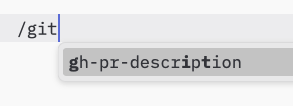
However, implementors are free to expose prompts through any interface pattern that suits their needs—the protocol itself does not mandate any specific user interaction model.
Capabilities
Servers that support prompts MUST declare the prompts capability during
initialization:
{
  "capabilities": {
    "prompts": {
      "listChanged": true
    }
  }
}
listChanged indicates whether the server will emit notifications when the list of
available prompts changes.
Protocol Messages
Listing Prompts
To retrieve available prompts, clients send a prompts/list request. This operation
supports pagination.
Request:
{
  "jsonrpc": "2.0",
  "id": 1,
  "method": "prompts/list",
  "params": {
    "cursor": "optional-cursor-value"
  }
}
Response:
{
  "jsonrpc": "2.0",
  "id": 1,
  "result": {
    "prompts": [
      {
        "name": "code_review",
        "description": "Asks the LLM to analyze code quality and suggest improvements",
        "arguments": [
          {
            "name": "code",
            "description": "The code to review",
            "required": true
          }
        ]
      }
    ],
    "nextCursor": "next-page-cursor"
  }
}
Getting a Prompt
To retrieve a specific prompt, clients send a prompts/get request. Arguments may be
auto-completed through the completion API.
Request:
{
  "jsonrpc": "2.0",
  "id": 2,
  "method": "prompts/get",
  "params": {
    "name": "code_review",
    "arguments": {
      "code": "def hello():\n    print('world')"
    }
  }
}
Response:
{
  "jsonrpc": "2.0",
  "id": 2,
  "result": {
    "description": "Code review prompt",
    "messages": [
      {
        "role": "user",
        "content": {
          "type": "text",
          "text": "Please review this Python code:\ndef hello():\n    print('world')"
        }
      }
    ]
  }
}
List Changed Notification
When the list of available prompts changes, servers that declared the listChanged
capability SHOULD send a notification:
{
  "jsonrpc": "2.0",
  "method": "notifications/prompts/list_changed"
}
Message Flow
Data Types
Prompt
A prompt definition includes:
name: Unique identifier for the promptdescription: Optional human-readable descriptionarguments: Optional list of arguments for customization
PromptMessage
Messages in a prompt can contain:
role: Either "user" or "assistant" to indicate the speakercontent: One of the following content types:
Text Content
Text content represents plain text messages:
{
  "type": "text",
  "text": "The text content of the message"
}
This is the most common content type used for natural language interactions.
Image Content
Image content allows including visual information in messages:
{
  "type": "image",
  "data": "base64-encoded-image-data",
  "mimeType": "image/png"
}
The image data MUST be base64-encoded and include a valid MIME type. This enables multi-modal interactions where visual context is important.
Audio Content
Audio content allows including audio information in messages:
{
  "type": "audio",
  "data": "base64-encoded-audio-data",
  "mimeType": "audio/wav"
}
The audio data MUST be base64-encoded and include a valid MIME type. This enables multi-modal interactions where audio context is important.
Embedded Resources
Embedded resources allow referencing server-side resources directly in messages:
{
  "type": "resource",
  "resource": {
    "uri": "resource://example",
    "mimeType": "text/plain",
    "text": "Resource content"
  }
}
Resources can contain either text or binary (blob) data and MUST include:
- A valid resource URI
- The appropriate MIME type
- Either text content or base64-encoded blob data
Embedded resources enable prompts to seamlessly incorporate server-managed content like documentation, code samples, or other reference materials directly into the conversation flow.
Error Handling
Servers SHOULD return standard JSON-RPC errors for common failure cases:
- Invalid prompt name:
-32602(Invalid params) - Missing required arguments:
-32602(Invalid params) - Internal errors:
-32603(Internal error)
Implementation Considerations
- Servers SHOULD validate prompt arguments before processing
- Clients SHOULD handle pagination for large prompt lists
- Both parties SHOULD respect capability negotiation
Security
Implementations MUST carefully validate all prompt inputs and outputs to prevent injection attacks or unauthorized access to resources.
6.3 Resources
The Model Context Protocol (MCP) provides a standardized way for servers to expose resources to clients. Resources allow servers to share data that provides context to language models, such as files, database schemas, or application-specific information. Each resource is uniquely identified by a URI.
User Interaction Model
Resources in MCP are designed to be application-driven, with host applications determining how to incorporate context based on their needs.
For example, applications could:
- Expose resources through UI elements for explicit selection, in a tree or list view
- Allow the user to search through and filter available resources
- Implement automatic context inclusion, based on heuristics or the AI model's selection
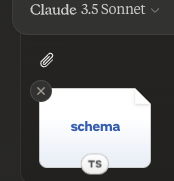
However, implementations are free to expose resources through any interface pattern that suits their needs—the protocol itself does not mandate any specific user interaction model.
Capabilities
Servers that support resources MUST declare the resources capability:
{
  "capabilities": {
    "resources": {
      "subscribe": true,
      "listChanged": true
    }
  }
}
The capability supports two optional features:
subscribe: whether the client can subscribe to be notified of changes to individual resources.listChanged: whether the server will emit notifications when the list of available resources changes.
Both subscribe and listChanged are optional—servers can support neither,
either, or both:
{
  "capabilities": {
    "resources": {} // Neither feature supported
  }
}
{
  "capabilities": {
    "resources": {
      "subscribe": true // Only subscriptions supported
    }
  }
}
{
  "capabilities": {
    "resources": {
      "listChanged": true // Only list change notifications supported
    }
  }
}
Protocol Messages
Listing Resources
To discover available resources, clients send a resources/list request. This operation
supports pagination.
Request:
{
  "jsonrpc": "2.0",
  "id": 1,
  "method": "resources/list",
  "params": {
    "cursor": "optional-cursor-value"
  }
}
Response:
{
  "jsonrpc": "2.0",
  "id": 1,
  "result": {
    "resources": [
      {
        "uri": "file:///project/src/main.rs",
        "name": "main.rs",
        "description": "Primary application entry point",
        "mimeType": "text/x-rust"
      }
    ],
    "nextCursor": "next-page-cursor"
  }
}
Reading Resources
To retrieve resource contents, clients send a resources/read request:
Request:
{
  "jsonrpc": "2.0",
  "id": 2,
  "method": "resources/read",
  "params": {
    "uri": "file:///project/src/main.rs"
  }
}
Response:
{
  "jsonrpc": "2.0",
  "id": 2,
  "result": {
    "contents": [
      {
        "uri": "file:///project/src/main.rs",
        "mimeType": "text/x-rust",
        "text": "fn main() {\n    println!(\"Hello world!\");\n}"
      }
    ]
  }
}
Resource Templates
Resource templates allow servers to expose parameterized resources using URI templates. Arguments may be auto-completed through the completion API. This operation supports pagination.
Request:
{
  "jsonrpc": "2.0",
  "id": 3,
  "method": "resources/templates/list",
  "params": {
    "cursor": "optional-cursor-value"
  }
}
Response:
{
  "jsonrpc": "2.0",
  "id": 3,
  "result": {
    "resourceTemplates": [
      {
        "uriTemplate": "file:///{path}",
        "name": "Project Files",
        "description": "Access files in the project directory",
        "mimeType": "application/octet-stream"
      }
    ],
    "nextCursor": "next-page-cursor"
  }
}
List Changed Notification
When the list of available resources changes, servers that declared the listChanged
capability SHOULD send a notification:
{
  "jsonrpc": "2.0",
  "method": "notifications/resources/list_changed"
}
Subscriptions
The protocol supports optional subscriptions to resource changes. Clients can subscribe to specific resources and receive notifications when they change:
Subscribe Request:
{
  "jsonrpc": "2.0",
  "id": 4,
  "method": "resources/subscribe",
  "params": {
    "uri": "file:///project/src/main.rs"
  }
}
Update Notification:
{
  "jsonrpc": "2.0",
  "method": "notifications/resources/updated",
  "params": {
    "uri": "file:///project/src/main.rs"
  }
}
Message Flow
Data Types
Resource
A resource definition includes:
uri: Unique identifier for the resourcename: Human-readable namedescription: Optional descriptionmimeType: Optional MIME typesize: Optional size in bytes
Resource Contents
Resources can contain either text or binary data:
Text Content
{
  "uri": "file:///example.txt",
  "mimeType": "text/plain",
  "text": "Resource content"
}
Binary Content
{
  "uri": "file:///example.png",
  "mimeType": "image/png",
  "blob": "base64-encoded-data"
}
Common URI Schemes
The protocol defines several standard URI schemes. This list not exhaustive—implementations are always free to use additional, custom URI schemes.
https://
Used to represent a resource available on the web.
Servers SHOULD use this scheme only when the client is able to fetch and load the resource directly from the web on its own—that is, it doesn’t need to read the resource via the MCP server.
For other use cases, servers SHOULD prefer to use another URI scheme, or define a custom one, even if the server will itself be downloading resource contents over the internet.
file://
Used to identify resources that behave like a filesystem. However, the resources do not need to map to an actual physical filesystem.
MCP servers MAY identify file:// resources with an
XDG MIME type,
like inode/directory, to represent non-regular files (such as directories) that don’t
otherwise have a standard MIME type.
git://
Git version control integration.
Error Handling
Servers SHOULD return standard JSON-RPC errors for common failure cases:
- Resource not found:
-32002 - Internal errors:
-32603
Example error:
{
  "jsonrpc": "2.0",
  "id": 5,
  "error": {
    "code": -32002,
    "message": "Resource not found",
    "data": {
      "uri": "file:///nonexistent.txt"
    }
  }
}
Security Considerations
- Servers MUST validate all resource URIs
- Access controls SHOULD be implemented for sensitive resources
- Binary data MUST be properly encoded
- Resource permissions SHOULD be checked before operations
6.4 Tools
The Model Context Protocol (MCP) allows servers to expose tools that can be invoked by language models. Tools enable models to interact with external systems, such as querying databases, calling APIs, or performing computations. Each tool is uniquely identified by a name and includes metadata describing its schema.
User Interaction Model
Tools in MCP are designed to be model-controlled, meaning that the language model can discover and invoke tools automatically based on its contextual understanding and the user's prompts.
However, implementations are free to expose tools through any interface pattern that suits their needs—the protocol itself does not mandate any specific user interaction model.
Capabilities
Servers that support tools MUST declare the tools capability:
{
  "capabilities": {
    "tools": {
      "listChanged": true
    }
  }
}
listChanged indicates whether the server will emit notifications when the list of
available tools changes.
Protocol Messages
Listing Tools
To discover available tools, clients send a tools/list request. This operation supports
pagination.
Request:
{
  "jsonrpc": "2.0",
  "id": 1,
  "method": "tools/list",
  "params": {
    "cursor": "optional-cursor-value"
  }
}
Response:
{
  "jsonrpc": "2.0",
  "id": 1,
  "result": {
    "tools": [
      {
        "name": "get_weather",
        "description": "Get current weather information for a location",
        "inputSchema": {
          "type": "object",
          "properties": {
            "location": {
              "type": "string",
              "description": "City name or zip code"
            }
          },
          "required": ["location"]
        }
      }
    ],
    "nextCursor": "next-page-cursor"
  }
}
Calling Tools
To invoke a tool, clients send a tools/call request:
Request:
{
  "jsonrpc": "2.0",
  "id": 2,
  "method": "tools/call",
  "params": {
    "name": "get_weather",
    "arguments": {
      "location": "New York"
    }
  }
}
Response:
{
  "jsonrpc": "2.0",
  "id": 2,
  "result": {
    "content": [
      {
        "type": "text",
        "text": "Current weather in New York:\nTemperature: 72°F\nConditions: Partly cloudy"
      }
    ],
    "isError": false
  }
}
List Changed Notification
When the list of available tools changes, servers that declared the listChanged
capability SHOULD send a notification:
{
  "jsonrpc": "2.0",
  "method": "notifications/tools/list_changed"
}
Message Flow
Data Types
Tool
A tool definition includes:
name: Unique identifier for the tooldescription: Human-readable description of functionalityinputSchema: JSON Schema defining expected parametersannotations: optional properties describing tool behavior
Tool Result
Tool results can contain multiple content items of different types:
Text Content
{
  "type": "text",
  "text": "Tool result text"
}
Image Content
{
  "type": "image",
  "data": "base64-encoded-data",
  "mimeType": "image/png"
}
Audio Content
{
  "type": "audio",
  "data": "base64-encoded-audio-data",
  "mimeType": "audio/wav"
}
Embedded Resources
Resources MAY be embedded, to provide additional context or data, behind a URI that can be subscribed to or fetched again by the client later:
{
  "type": "resource",
  "resource": {
    "uri": "resource://example",
    "mimeType": "text/plain",
    "text": "Resource content"
  }
}
Error Handling
Tools use two error reporting mechanisms:
-
Protocol Errors: Standard JSON-RPC errors for issues like:
- Unknown tools
- Invalid arguments
- Server errors
-
Tool Execution Errors: Reported in tool results with
isError: true:- API failures
- Invalid input data
- Business logic errors
Example protocol error:
{
  "jsonrpc": "2.0",
  "id": 3,
  "error": {
    "code": -32602,
    "message": "Unknown tool: invalid_tool_name"
  }
}
Example tool execution error:
{
  "jsonrpc": "2.0",
  "id": 4,
  "result": {
    "content": [
      {
        "type": "text",
        "text": "Failed to fetch weather data: API rate limit exceeded"
      }
    ],
    "isError": true
  }
}
Security Considerations
-
Servers MUST:
- Validate all tool inputs
- Implement proper access controls
- Rate limit tool invocations
- Sanitize tool outputs
-
Clients SHOULD:
- Prompt for user confirmation on sensitive operations
- Show tool inputs to the user before calling the server, to avoid malicious or accidental data exfiltration
- Validate tool results before passing to LLM
- Implement timeouts for tool calls
- Log tool usage for audit purposes
6.5 Utilities
6.5.1 Completion
The Model Context Protocol (MCP) provides a standardized way for servers to offer argument autocompletion suggestions for prompts and resource URIs. This enables rich, IDE-like experiences where users receive contextual suggestions while entering argument values.
User Interaction Model
Completion in MCP is designed to support interactive user experiences similar to IDE code completion.
For example, applications may show completion suggestions in a dropdown or popup menu as users type, with the ability to filter and select from available options.
However, implementations are free to expose completion through any interface pattern that suits their needs—the protocol itself does not mandate any specific user interaction model.
Capabilities
Servers that support completions MUST declare the completions capability:
{
  "capabilities": {
    "completions": {}
  }
}
Protocol Messages
Requesting Completions
To get completion suggestions, clients send a completion/complete request specifying
what is being completed through a reference type:
Request:
{
  "jsonrpc": "2.0",
  "id": 1,
  "method": "completion/complete",
  "params": {
    "ref": {
      "type": "ref/prompt",
      "name": "code_review"
    },
    "argument": {
      "name": "language",
      "value": "py"
    }
  }
}
Response:
{
  "jsonrpc": "2.0",
  "id": 1,
  "result": {
    "completion": {
      "values": ["python", "pytorch", "pyside"],
      "total": 10,
      "hasMore": true
    }
  }
}
Reference Types
The protocol supports two types of completion references:
| Type | Description | Example |
|---|---|---|
ref/prompt |
References a prompt by name | {"type": "ref/prompt", "name": "code_review"} |
ref/resource |
References a resource URI | {"type": "ref/resource", "uri": "file:///{path}"} |
Completion Results
Servers return an array of completion values ranked by relevance, with:
- Maximum 100 items per response
- Optional total number of available matches
- Boolean indicating if additional results exist
Message Flow
Data Types
CompleteRequest
ref: APromptReferenceorResourceReferenceargument: Object containing:name: Argument namevalue: Current value
CompleteResult
completion: Object containing:values: Array of suggestions (max 100)total: Optional total matcheshasMore: Additional results flag
Error Handling
Servers SHOULD return standard JSON-RPC errors for common failure cases:
- Method not found:
-32601(Capability not supported) - Invalid prompt name:
-32602(Invalid params) - Missing required arguments:
-32602(Invalid params) - Internal errors:
-32603(Internal error)
Implementation Considerations
-
Servers SHOULD:
- Return suggestions sorted by relevance
- Implement fuzzy matching where appropriate
- Rate limit completion requests
- Validate all inputs
-
Clients SHOULD:
- Debounce rapid completion requests
- Cache completion results where appropriate
- Handle missing or partial results gracefully
Security
Implementations MUST:
- Validate all completion inputs
- Implement appropriate rate limiting
- Control access to sensitive suggestions
- Prevent completion-based information disclosure
6.5.2 Logging
The Model Context Protocol (MCP) provides a standardized way for servers to send structured log messages to clients. Clients can control logging verbosity by setting minimum log levels, with servers sending notifications containing severity levels, optional logger names, and arbitrary JSON-serializable data.
User Interaction Model
Implementations are free to expose logging through any interface pattern that suits their needs—the protocol itself does not mandate any specific user interaction model.
Capabilities
Servers that emit log message notifications MUST declare the logging capability:
{
  "capabilities": {
    "logging": {}
  }
}
Log Levels
The protocol follows the standard syslog severity levels specified in RFC 5424:
| Level | Description | Example Use Case |
|---|---|---|
| debug | Detailed debugging information | Function entry/exit points |
| info | General informational messages | Operation progress updates |
| notice | Normal but significant events | Configuration changes |
| warning | Warning conditions | Deprecated feature usage |
| error | Error conditions | Operation failures |
| critical | Critical conditions | System component failures |
| alert | Action must be taken immediately | Data corruption detected |
| emergency | System is unusable | Complete system failure |
Protocol Messages
Setting Log Level
To configure the minimum log level, clients MAY send a logging/setLevel request:
Request:
{
  "jsonrpc": "2.0",
  "id": 1,
  "method": "logging/setLevel",
  "params": {
    "level": "info"
  }
}
Log Message Notifications
Servers send log messages using notifications/message notifications:
{
  "jsonrpc": "2.0",
  "method": "notifications/message",
  "params": {
    "level": "error",
    "logger": "database",
    "data": {
      "error": "Connection failed",
      "details": {
        "host": "localhost",
        "port": 5432
      }
    }
  }
}
Message Flow
Error Handling
Servers SHOULD return standard JSON-RPC errors for common failure cases:
- Invalid log level:
-32602(Invalid params) - Configuration errors:
-32603(Internal error)
Implementation Considerations
-
Servers SHOULD:
- Rate limit log messages
- Include relevant context in data field
- Use consistent logger names
- Remove sensitive information
-
Clients MAY:
- Present log messages in the UI
- Implement log filtering/search
- Display severity visually
- Persist log messages
Security
-
Log messages MUST NOT contain:
- Credentials or secrets
- Personal identifying information
- Internal system details that could aid attacks
-
Implementations SHOULD:
- Rate limit messages
- Validate all data fields
- Control log access
- Monitor for sensitive content
6.5.3 Pagination
The Model Context Protocol (MCP) supports paginating list operations that may return large result sets. Pagination allows servers to yield results in smaller chunks rather than all at once.
Pagination is especially important when connecting to external services over the internet, but also useful for local integrations to avoid performance issues with large data sets.
Pagination Model
Pagination in MCP uses an opaque cursor-based approach, instead of numbered pages.
- The cursor is an opaque string token, representing a position in the result set
- Page size is determined by the server, and clients MUST NOT assume a fixed page size
Response Format
Pagination starts when the server sends a response that includes:
- The current page of results
- An optional
nextCursorfield if more results exist
{
  "jsonrpc": "2.0",
  "id": "123",
  "result": {
    "resources": [...],
    "nextCursor": "eyJwYWdlIjogM30="
  }
}
Request Format
After receiving a cursor, the client can continue paginating by issuing a request including that cursor:
{
  "jsonrpc": "2.0",
  "method": "resources/list",
  "params": {
    "cursor": "eyJwYWdlIjogMn0="
  }
}
Pagination Flow
Operations Supporting Pagination
The following MCP operations support pagination:
resources/list- List available resourcesresources/templates/list- List resource templatesprompts/list- List available promptstools/list- List available tools
Implementation Guidelines
-
Servers SHOULD:
- Provide stable cursors
- Handle invalid cursors gracefully
-
Clients SHOULD:
- Treat a missing
nextCursoras the end of results - Support both paginated and non-paginated flows
- Treat a missing
-
Clients MUST treat cursors as opaque tokens:
- Don't make assumptions about cursor format
- Don't attempt to parse or modify cursors
- Don't persist cursors across sessions
Error Handling
Invalid cursors SHOULD result in an error with code -32602 (Invalid params).